AI Tools for Virtual Assistants: Best Practices for the 2026 VA Stack
Your assistant produces nine client emails before lunch on Monday. Two of them quote a service package you retired in October. The error surfaces on Thursday, when a client asks why her renewal price dropped.
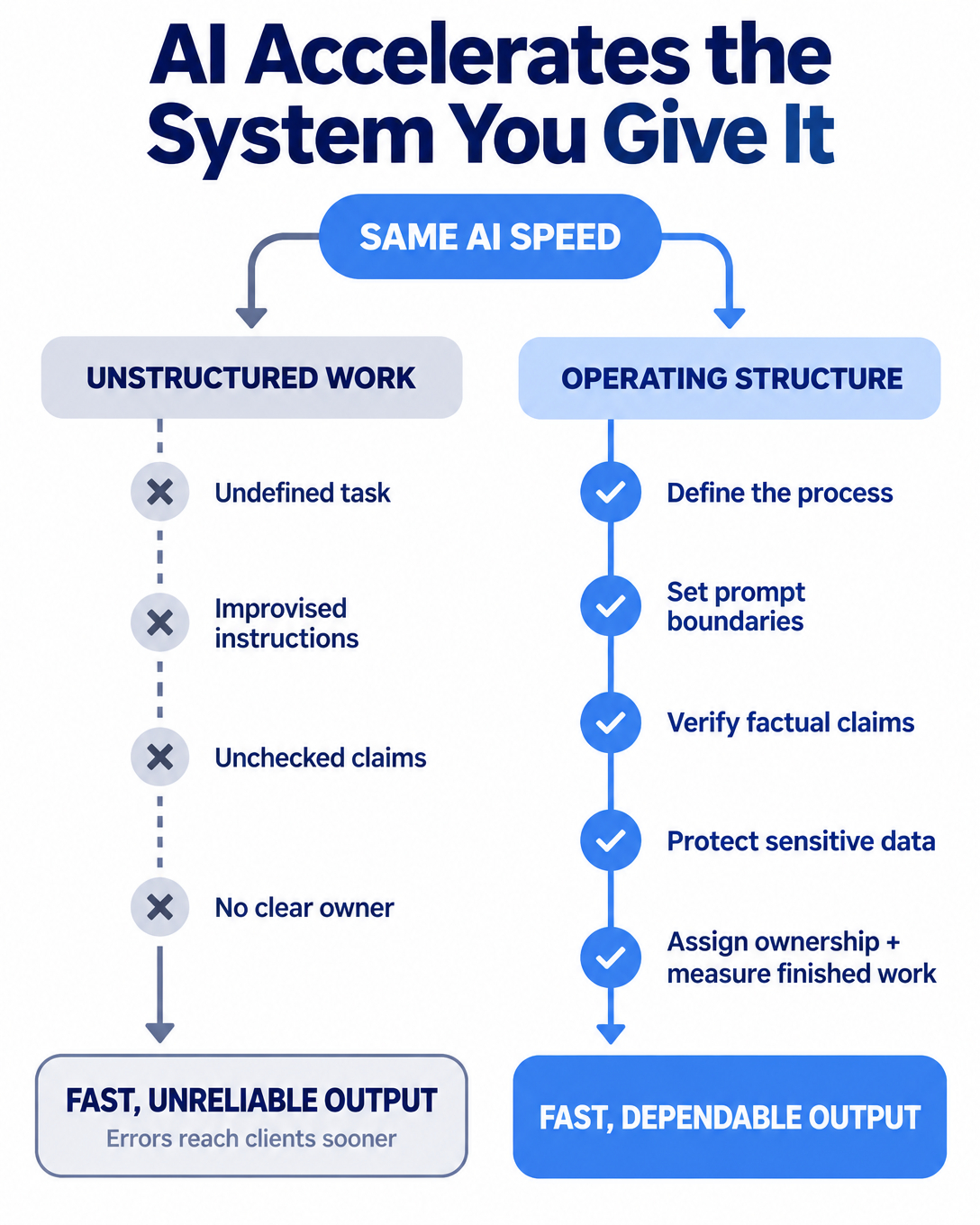
The tools in the 2026 assistant stack are fast. Speed moves good work and bad work to the client at the same rate. The difference between the two outcomes is the management structure around the tools, and that structure is what this article covers.
We train every assistant we place on the same core categories: ChatGPT and Claude for drafting, Perplexity for sourced research, Otter.ai for meeting capture, and Zapier for handoffs between systems. Selecting the tools takes an afternoon. Installing the practices takes two weeks, and the practices decide the result.
The evidence for structure over tooling
A Harvard Business School field experiment with 758 Boston Consulting Group consultants found that people using AI on suitable tasks finished 25.1% faster with output quality rated more than 40% higher. On tasks outside the model's capability range, the same users were 19 percentage points more likely to produce incorrect solutions.
One tool produced both outcomes. Task assignment made the difference, and task assignment is a management decision.
Adoption has already settled the question of whether assistants will use these tools. Around 73% of virtual assistants use AI tools at least weekly, and 47% use them daily. Since the tools are standard, the review habits around them are what you should evaluate when you build your stack.
Here are the six practices we install in every pod before an assistant touches live client work.
Practice one: document the task before you accelerate it
AI accelerates execution of a defined process. When no definition exists, it accelerates improvisation, and improvised work resists review and resists handoff.
The method is simple. The assistant records a screen walkthrough of the task, runs the transcript through a drafting tool to format it into numbered steps, and files the result where the next person can find it. Documentation becomes a byproduct of doing the work rather than a separate project waiting for a free weekend.
Week one takes more of your time, since you explain how the work currently runs. That is the documentation phase, and every week after it repays the investment.
Practice two: write a prompt standard and keep it in a shared document
Vague prompts produce vague drafts, and vague drafts produce revision cycles that consume the speed you paid for.
Our standard requires every drafting prompt to state five inputs: the audience, the goal of the message, the voice to match, the limits on what can be claimed, and one approved example from your own files. An assistant following that standard produces usable output on the first pass far more often than one improvising each request.
Store the standard in a shared document with three worked examples from your business. A standard living in one person's head leaves with that person.
Practice three: verify every factual claim before it moves
AI systems state wrong information with full confidence. The industry average hallucination rate sits near 20%, roughly one error in every five queries. Applied to the two hundred client-facing items an assistant produces in a month, that rate stops being an abstraction.
The rule we enforce: anything factual, financial, or client-facing gets checked by the assistant before it leaves draft stage. Prices against the current price sheet. Dates against the calendar. Legal or regulatory statements against the cited source. Perplexity provides clickable citations for exactly this step, and the assistant clicks them.
This check is commonly dropped once output starts looking reliable. Fifty clean drafts say nothing about draft fifty-one, so the check stays permanent and appears in the written procedure.
Practice four: name the data that never enters a public tool
Client financials, personal information, and anything under an NDA stay out of public AI tools. A rule stated at that level of generality fails in daily use, because the assistant meets edge cases every morning. Write the rule down with named categories and named examples from your own business.
For a bookkeeping practice, the list includes client returns, bank statements, and payroll files. For a pest control company, it includes customer addresses tied to payment records. The assistant answers the question of what can enter ChatGPT by reading the document, without interrupting you.
Pair the data rule with access structure. Every tool runs through your accounts, with unique logins, two-factor authentication, and credentials shared through a password manager such as 1Password or Bitwarden. You own every account, control every permission, and can revoke access immediately.
Practice five: attach a named owner and a schedule to every workflow
Automations fail quietly. A form field gets renamed, a Zapier connection expires, and new leads stop reaching the CRM while every dashboard looks normal. The fix is ownership. One named person checks the automation log on a set schedule and escalates anything broken the same day.
The same principle covers the whole stack. The assistant checks the lead pipeline twice daily. The assistant sends the Otter meeting recap before end of day. The pod manager reviews output quality in the weekly check-in. You review the Friday scorecard.
Work becomes dependable when a specific person owns it on a specific rhythm. A subscription creates access. It creates no accountability.
Practice six: measure finished work per paid hour
The number worth tracking is finished work per paid hour, because that is the number this stack moves. Small business owners spend roughly 36% of the workweek on administrative tasks, about sixteen hours on average.
Run the arithmetic on your own week. If your blended hourly value across estimating, selling, and client delivery is $200, sixteen admin hours carry an opportunity cost of $3,200 every week. An assistant working inside the six practices above clears that work at a fraction of the cost while the verification steps hold quality in place.
Review the numbers monthly. Count the recurring tasks transferred, the hours they previously took you, and the exceptions that still required your decision. A stable process produces fewer exceptions over time, so a flat exception count for two consecutive months signals that the documentation needs revision.
What this requires from you, and where it stops
These practices assume conditions on your side. Your recurring tasks exist in a definable form. You can grant tool access safely through your own accounts. You will spend the first two weeks answering questions while the documentation gets built. An assistant placed into an undocumented business becomes a second person who has to ask you how everything works.
The stack also has stated limits. It fixes slow follow-up, inconsistent meeting recaps, and administrative backlog. It leaves a weak offer, unclear pricing, and unresolved leadership decisions exactly where it found them.
A practical first step: list the ten tasks you repeated last week that required none of your professional judgment. Those become the first candidates for transfer, and the six practices above determine how safely that transfer runs.
We build every pod at Go Task-Free this way, with the documentation, the prompt standard, the verification rules, the data boundaries, and the reporting rhythm installed before the assistant touches a live account. Anyone can buy the tools. The operating structure around them produces the result.